Lecture 16: Triggers, Views, Access Control#
Announcements#
Homework #4, please check your answers even if you have submitted against the expected answers.
Homework #5 to be out soon (later today or tomorrow morning), due next week.
Multiple lecture exercises this week to get you read for the next exam. Additional SQL exercises on monday and thursday.
Lecture Exercises 15 and 17 out today, due on thursday at 2pm.
Lecture Exercises 16 and 18 out on thursday, due on monday at 2pm.
We will drop the lowest 4 lecture exercises, use them to learn and practice.
Exam #2 next week thursday. It will be solely on SQL. It will incorporate everything we did in class, including access control (today or or thursday).
Procedural SQL that will be covered on Thursday will not be in Exam #2.
Look at last year’s exams to find examples of what to expect.
Exam questions will expect you to have learnt the types of skills we exercises in the homeworks this semester.
Make sure you know how to write correct SQL in paper and pencil, and in a limited amount of time.
Solving past exams without looking at answers is the best way to do this.
Transactions#
begin ;
[[transaction block treated as a unit]]
commit ;
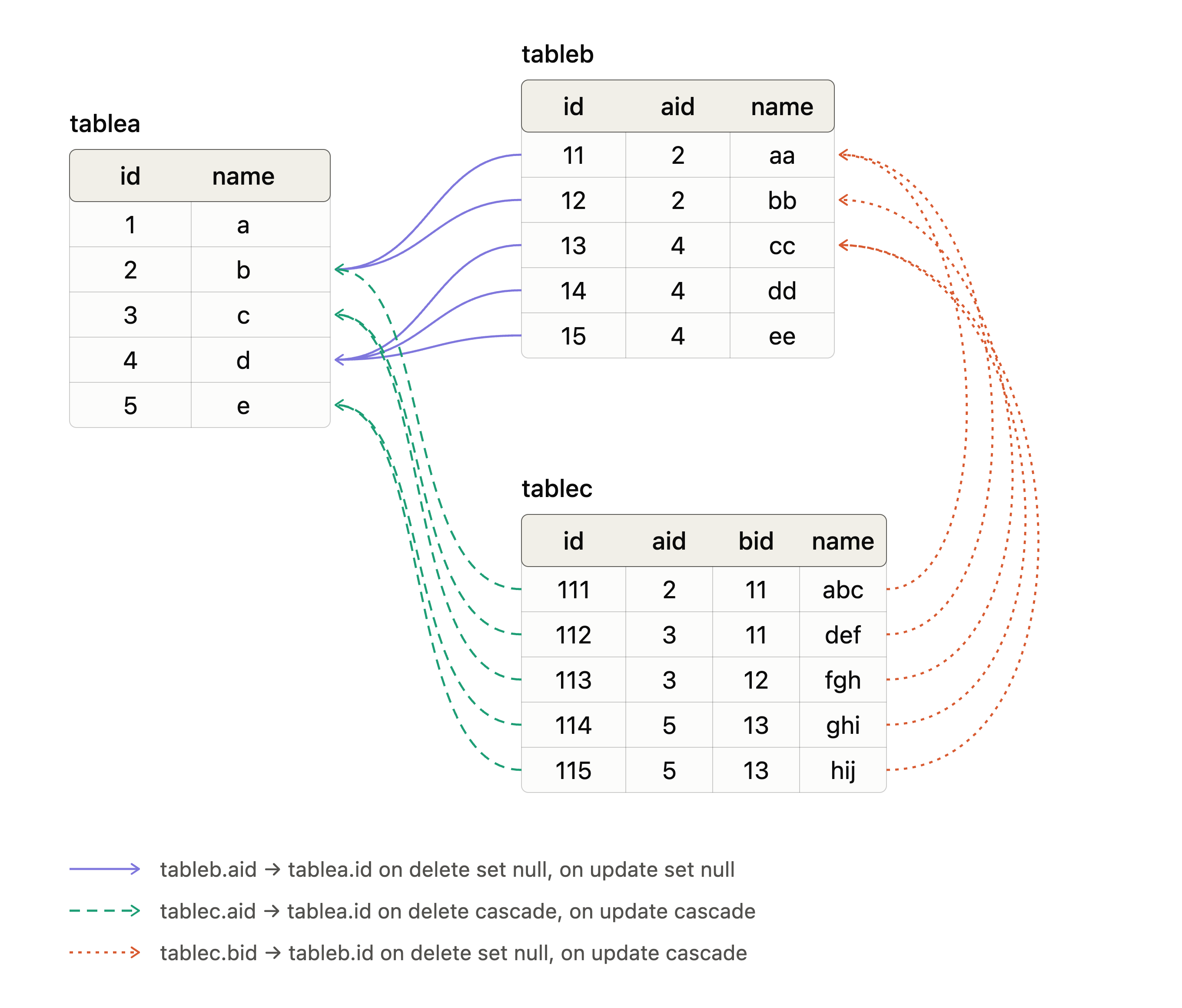
Recap of foreign keys#
drop table if exists tablec;
drop table if exists tableb;
drop table if exists tablea;

create table tablea (
       id     int primary key
       , name varchar(10)
) ;

create table tableb (
       id     int primary key
       , aid    int
       , name varchar(10)
       , foreign key (aid) references tablea(id)
         on delete set null on update set null
) ;

create table tablec (
       id     int primary key
       , aid    int not null
       , bid    int not null
       , name varchar(10)
       , foreign key (aid) references tablea(id)
         on delete cascade on update cascade
       , foreign key (bid) references tableb(id)
         on delete set null on update cascade
) ;

insert into tablea values(1,'a');
insert into tablea values(2,'b');
insert into tablea values(3,'c');
insert into tablea values(4,'d');
insert into tablea values(5,'e');

insert into tableb values(11,2,'aa');
insert into tableb values(12,2,'bb');
insert into tableb values(13,4,'cc');
insert into tableb values(14,4,'dd');
insert into tableb values(15,4,'ee');

insert into tablec values(111,2,11,'abc');
insert into tablec values(112,3,11,'def');
insert into tablec values(113,3,12,'fgh');
insert into tablec values(114,5,13,'ghi');
insert into tablec values(115,5,13,'hij');
Triggers#
Programs that are activated when a database change happens (tables, views, etc.)
Execute either before or after any INSERT, UPDATE, or DELETE operation
INSERT: only has NEW value for row
DELETE: only have OLD value for row
UPDATE: have both OLD value and a NEW value
Two types of triggers:
BEFORE (the change)
AFTER (the change)
Trigger level:
Statement level (once per SQL statement)
Row level: for every tuple you are changing (once per modified row)
UPDATE triggers can moreover be set to fire only if certain columns are mentioned in the SET clause of the UPDATE statement
Statement-level BEFORE triggers naturally fire before the statement starts to do anything.
Row-level BEFORE triggers fire immediately before a particular row is operated on.
Statement-level AFTER triggers fire at the very end of the statement.
Row-level AFTER triggers fire at the end of the statement (but before any statement-level AFTER triggers).
Trigger functions invoked by per-statement triggers should always return NULL.
Trigger functions invoked by per-row triggers can return a table row.
A BEFORE trigger can return NULL to skip the operation for the current row.
For row-level INSERT and UPDATE triggers only, the returned row becomes the row that will be inserted or will replace the row being updated.
drop function tableafix_f() cascade;
drop function tablebfix_f() cascade;

drop table if exists diff;

drop table diff;
create table diff (
     whenchanged date
     , change text
) ;
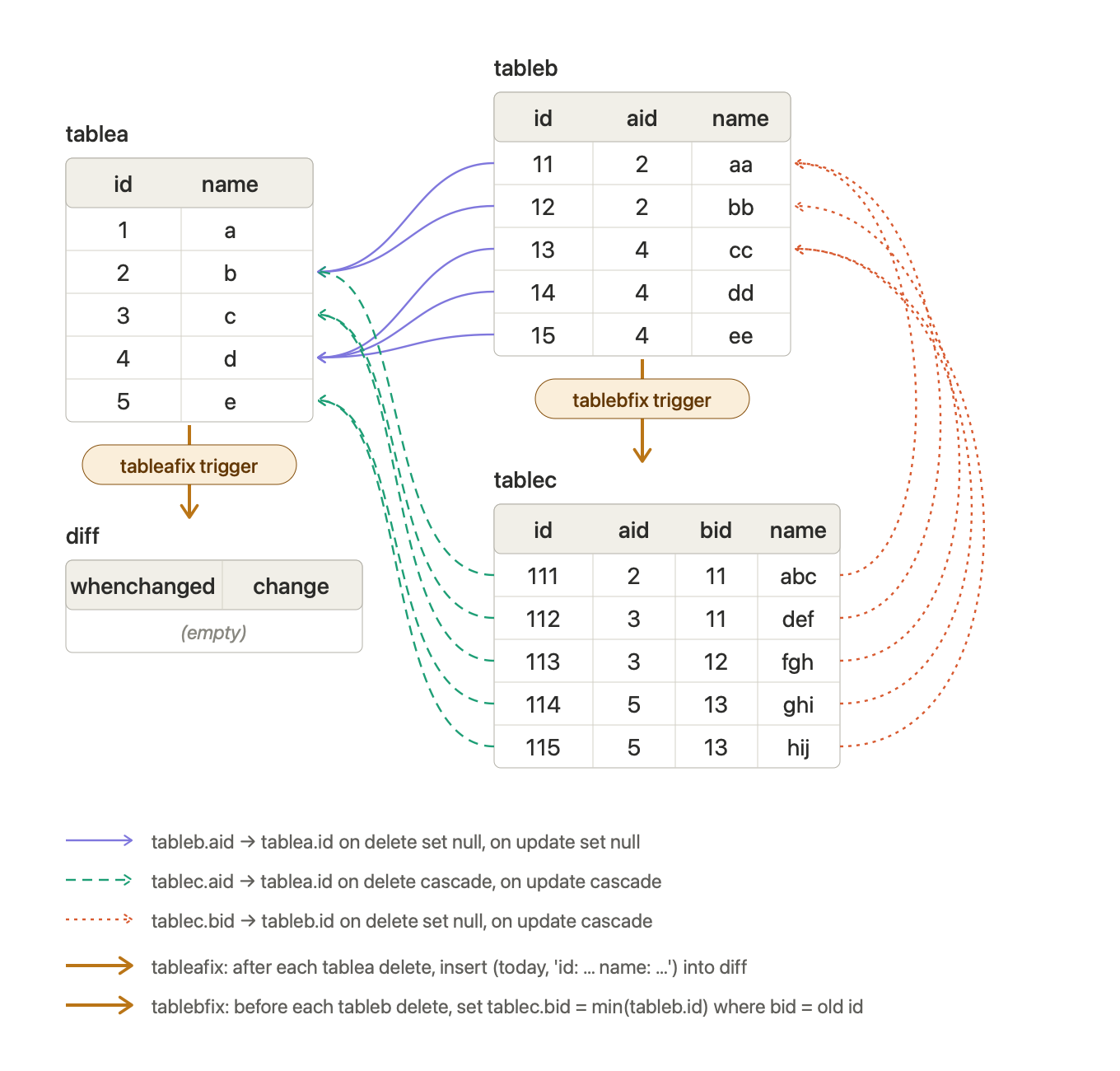
– For deletes from table a, add a tuple to table diff describing the change.
drop function tableafix_f() cascade ;

CREATE FUNCTION tableafix_f () RETURNS trigger AS $$
begin
   insert into diff
   values(now()::date, 'id: '||(old.id)::varchar||' name: '||old.name) ;
   return old ;
end ;
$$ language plpgsql ;

CREATE TRIGGER tableafix AFTER DELETE ON tablea
  FOR EACH ROW EXECUTE FUNCTION tableafix_f();
– For deletes from table b, first change the referencing tuples in table c to be lowest b id in the table.
drop function tablebfix_f() cascade;

create function tablebfix_f () returns trigger as $$
begin
  UPDATE tablec
  SET bid = (select min(id) from tableb)
  WHERE bid = OLD.id ;
  RETURN OLD ;
end ;
$$ language plpgsql ;

create trigger tablebfix BEFORE delete on tableb
  for each row execute function tablebfix_f() ;
VIEWS#
Anonymous views are only available when executing the query.
WITH starbakers AS
   (SELECT distinct b.baker, b.fullname, count(r.baker) as numstarbaker
    FROM  bakers b left join results r on
          r.result = 'star baker' and r.baker = b.baker
    GROUP BY b.baker)
SELECT
   s.baker
   , s.fullname
   , s.numstarbaker
   , count(*) as numrank1
FROM
   technicals t
   , starbakers s
WHERE
   s.baker = t.baker
   and t.rank = 1
GROUP BY
   s.baker
   , s.fullname
   , s.numstarbaker
ORDER BY
   numrank1 asc ;
(Named) views are persistent, they can be used in multiple queries like any other relation.
CREATE VIEW starbakers AS
SELECT distinct b.baker, b.fullname, count(r.baker) as numstarbaker
    FROM  bakers b left join results r on
          r.result = 'star baker' and r.baker = b.baker
    GROUP BY b.baker ;
– Views are just queries, not stored tuples!
– Let’s us create a view for older bakers.
drop view olderbakers ;

create view olderbakers(baker, age) as
select baker, age
from bakers
where age > 45
with check option;

create view ages(age) as
select distinct age from bakers ;
Updateable views should have no distinct and not multiple relations, so that an update can be unambiguously translated to a tuple in the base relations.
See course notes and the book for more details.
What now? Recursion?#
-- children

select parent, child from parents ;

-- grand children

select
   p1.parent
   , p2.child
from
   parents p1
   , parents p2
where
   p1.child = p2.parent;

-- great grand children

select
   p1.parent
   , p3.child
from
   parents p1
   , parents p2
   , parents p3
where
   p1.child = p2.parent
   and p2.child = p3.parent;


-- great great grand children

select
   p1.parent
   , p4.child
from
   parents p1
   , parents p2
   , parents p3
   , parents p4
where
   p1.child = p2.parent
   and p2.child = p3.parent
   and p3.child = p4.parent;

-- All ancestors

-- (parent, child) is an ancestor of level 1

-- (anc, desc) is an ancestor of level x
   (desc, child) is a parent relation

   (anc, child) is an ancestor of level x+1


WITH RECURSIVE anc AS
   (SELECT parent as anc, child as desc, 1 as level FROM parents
    union
    SELECT a.anc, p.child, a.level+1
    FROM  anc a, parents p
    WHERE a.desc = p.parent)
SELECT
    *
FROM
    anc
WHERE
    level > 2
;